Scheduling
Reports can be run at any time, or they can be set to run on a schedule. The results of those scheduled runs are kept for later review, and can be automatically distributed to a list of recipients. Adding recipients can also give access to a particular report when their role doesn't give them access to all reports automatically.
One report recipient may receive a different set of results than another depending on their reporting hierarchy within Scaffold.
Establishing roles and reporting hierarchies can be complex, to get a better understanding contact your LMS administrator or the Nine Lanterns Support Desk via Zendesk.
Schedule settings
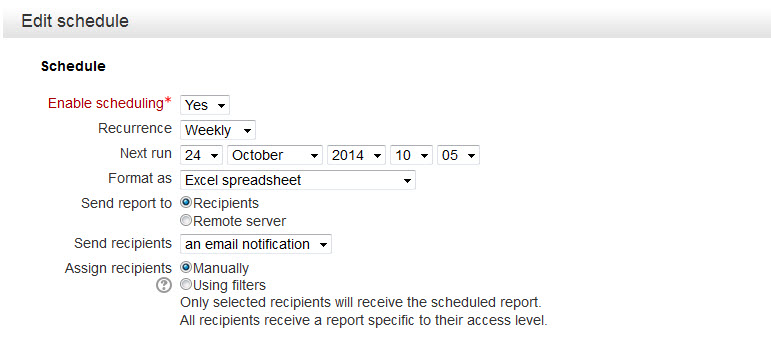
| Setting | Description | Options |
| Enable scheduling | Whether or not the report is set to run in the future | Yes/No |
| Recurrence | How often the report will run. | Once, Daily, Weekly, Monthly, Yearly |
| Next run | When the report is set to next run | Date and time |
| Format as | Document type the report is recorded in | Excel, Open Document, Tab separated, Comma separated, Unpaged XHTML |
| Send report to | Where the report is sent to | Recipients: Sent to the listed recipients Remote server: Sent to a server where it can retrieved manually or by automatic process |
| Send recipients | What, if anything, the recipients should be sent each time the report is run |
Nothing: Nothing sent |
| Assign recipients | How the list of recipients is defined | Manually: Choose from a list of all available recipients Using filters: Define recipients by use of filters |
Recipient Filters
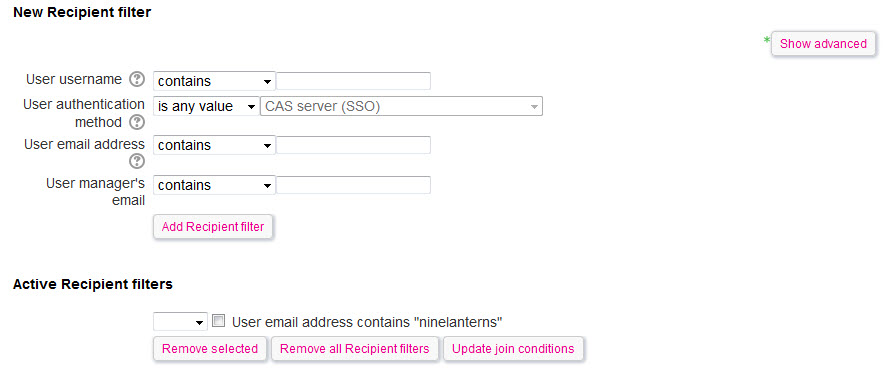
If Assign recipients is set to Using filters then add user filters to define the set of recipients. How to use filters is described here
Recipients
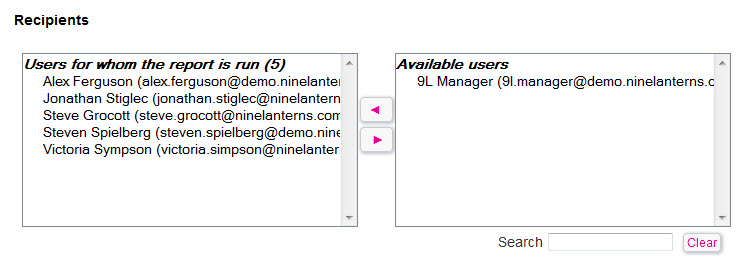
If Assign recipients is set to Manually then choose all the recipients from the right-hand 'Available users' column and then move them to the left-hand 'Users for whom the report is run' column using the arrows between them.
Do the opposite to remove recipients.
Remote server
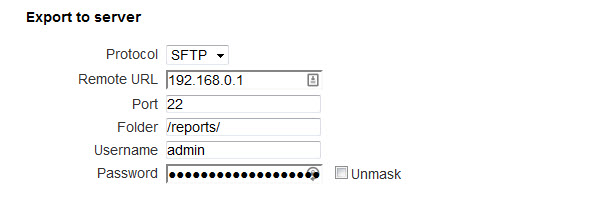
If Send report to is set to Remote server then fill in the details of account needed to access the server.
Comments
Related articles